 ClubPlugins
 Early access · $30 · out now
Quick club masters of your own tracks.For testing on a club system, sending to DJs and playing out, before a professional mixes and masters them.
- References: released records you love, your own tracks, or the built-in club / house target
- A loud, club-ready reference master in one plug-in: MIX & MASTER, Fix the mix and four guided steps
- A professional mixing and mastering engineer is worth far more than this tool, and ClubMaster does not replace one. When the track is ready for release, take it to a pro.
- Compared at matched loudness · AU, VST3 and standalone for Mac · Windows beta: VST3
Windows (beta): VST3 for 64-bit Windows 10 and 11 (x64). Not code-signed yet, so Windows may warn before it opens; the read-me in the ZIP shows what to click. Same 7-day trial and the same $30 licence. ClubMix (MIX & MASTER, Fix the mix) is Mac-only for now. SHA-256 of the ZIP: a52a99b1128bad75541af0ca5944096adbddee7fc29fb1a8f3ae507fab03182a
What ClubMaster is for
- What it makes: a quick, loud club master of a track you made yourself, built from the reference tracks you pick or the built-in club / house target
- What it's for: hearing the track on a club system, sending it to DJs, or playing it out before it has been professionally mixed and mastered
- What it isn't: a replacement for a professional mixing and mastering engineer. A good engineer is far more valuable than this tool and hears things it can't
- When the track is ready for release: take it to a pro, and keep the ClubMaster version for your own demos and test plays
How it works
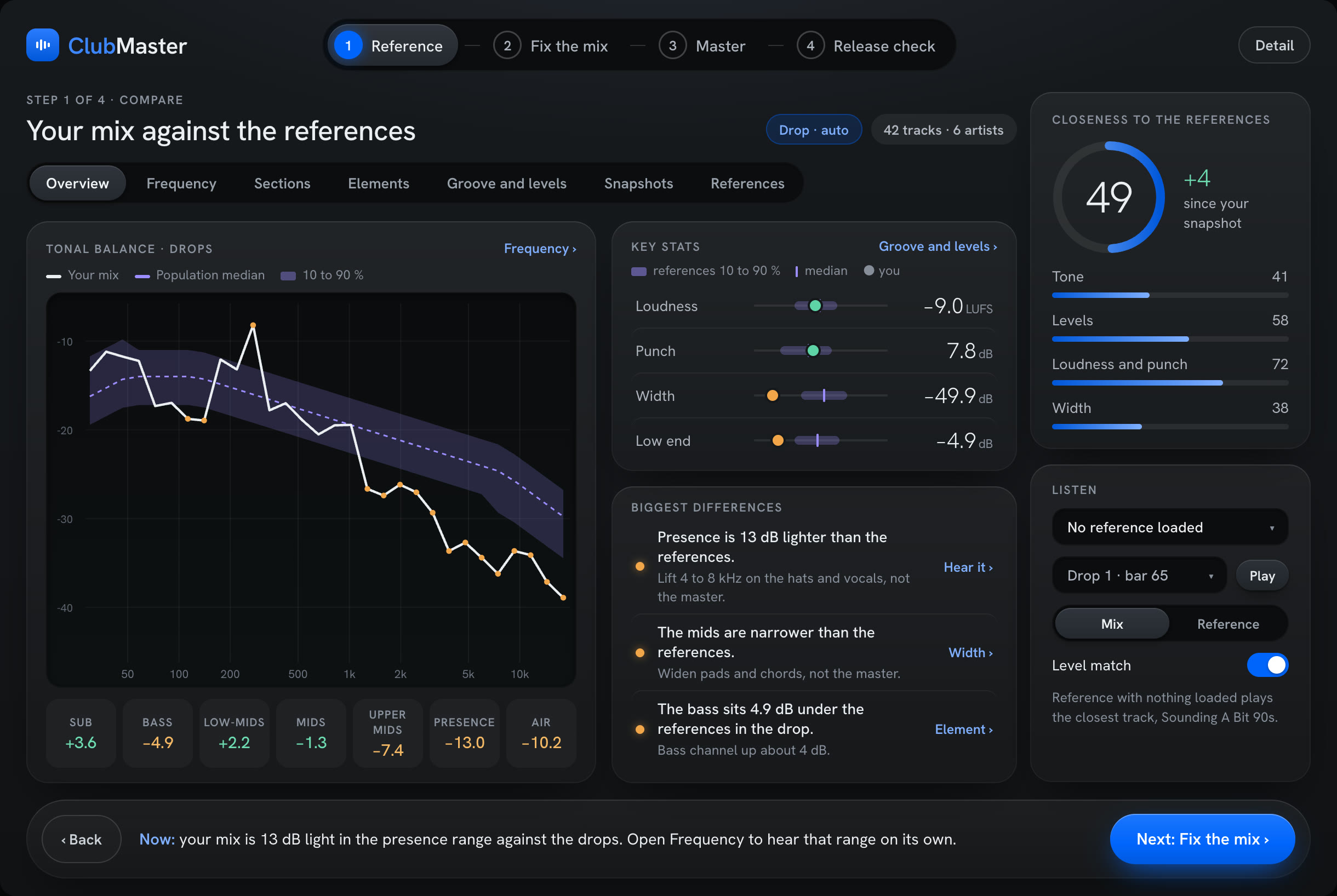
- 01Reference: tick any number of tracksMeasured into one range of tone, loudness, punch and width
- 02Compare: one closeness score, 0–100Your mix against that range, live, with the biggest differences in plain words
- 03Arrangement: the references' layout, bar by barBuild template and arrangement sets for Ableton Live
- 04Fix the mix: the biggest gaps firstA Fix button for each in Ableton Live
- 05Master: one chain, one AMOUNT dialLands on Streaming, Loud or Club loudness under a −1.0 dBTP ceiling
Any number of reference tracks.No limit on how many you tick.
How it works
- Add songs: WAV, AIFF, MP3, FLAC or M4A, 30 seconds to 20 minutes each; tick as many as you want
- Measured per song: 30 tonal bands from 30 Hz to 18 kHz; short-term (3 s), loudest-moment and integrated loudness; punch (peak to loudness); stereo width in 4 bands plus left/right correlation; where each section falls, bar by bar
- A range, not one target: your ticked tracks become the median and the 10–90% spread of every measurement, so one odd record can't pull the target
- Same part of the song: compare drops with drops, breakdowns with breakdowns, or the whole track
- Nothing ticked: the built-in club / house target
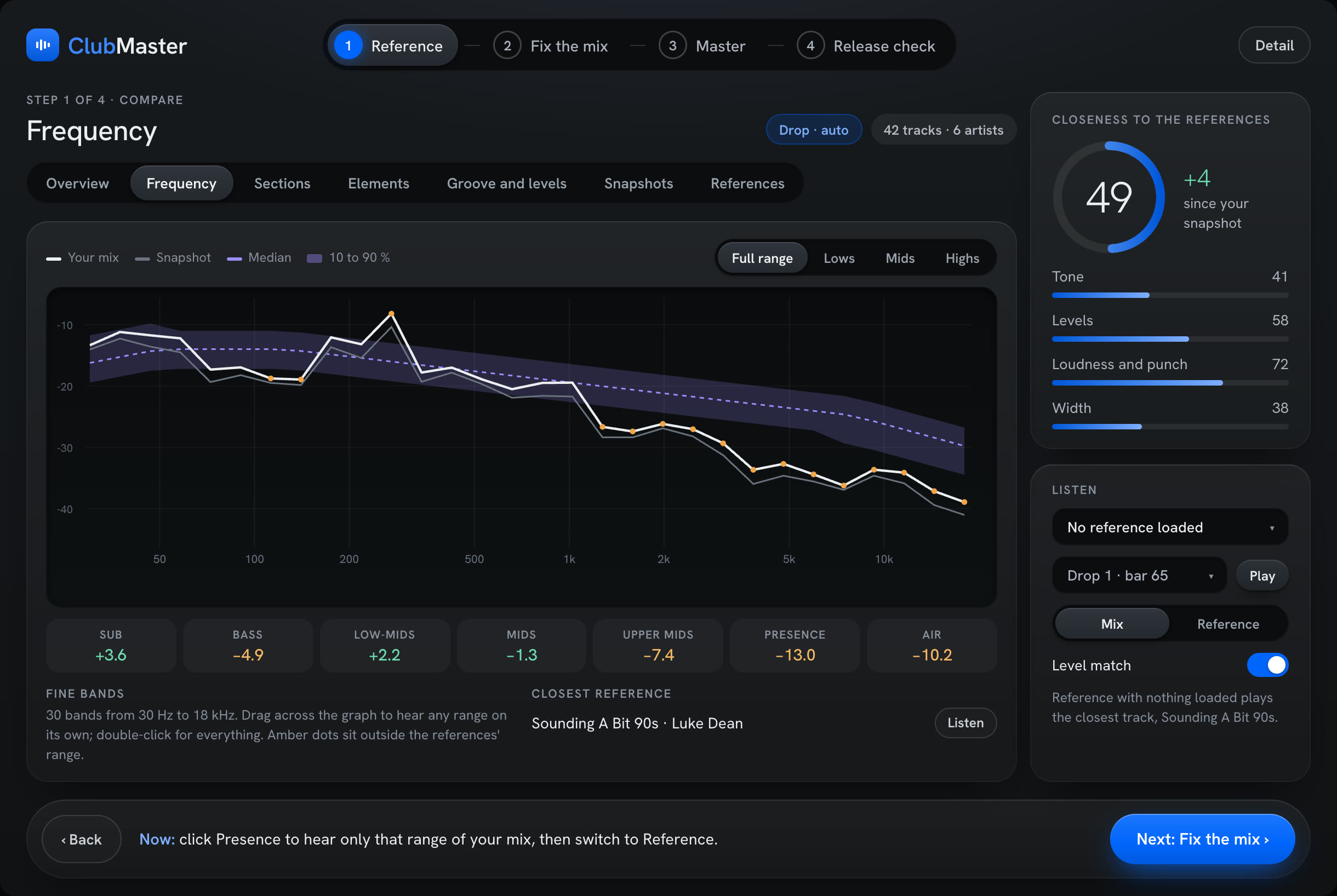
One closeness score, 0–100.Tone 50%, loudness and punch 25%, width 25%.
How it works
- Live: your mix is measured over the last 10 seconds as it plays and drawn against the references' range
- Matched loudness: tonal curves are measured relative to each song's loudness, so a louder track doesn't look brighter
- The score: each measurement scores full marks at the references' median, a little less at the edge of their range, and drops off beyond it
- Biggest differences: written as plain sentences, largest first, each with what to change
- Listen: switch between your mix and a reference, played at the loudness you're hearing from your master
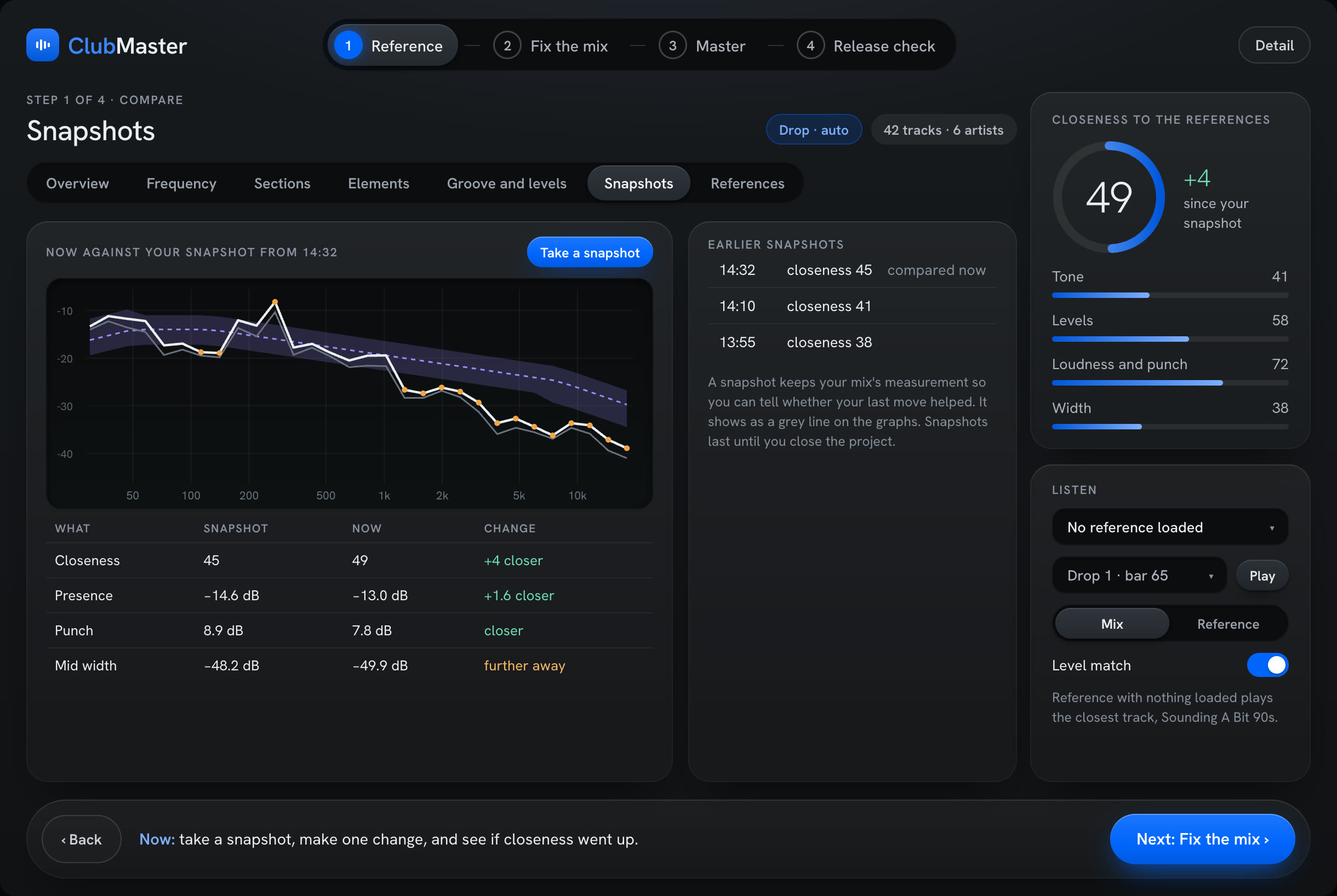
- Snapshots: save a moment, make one change, and see whether the score went up
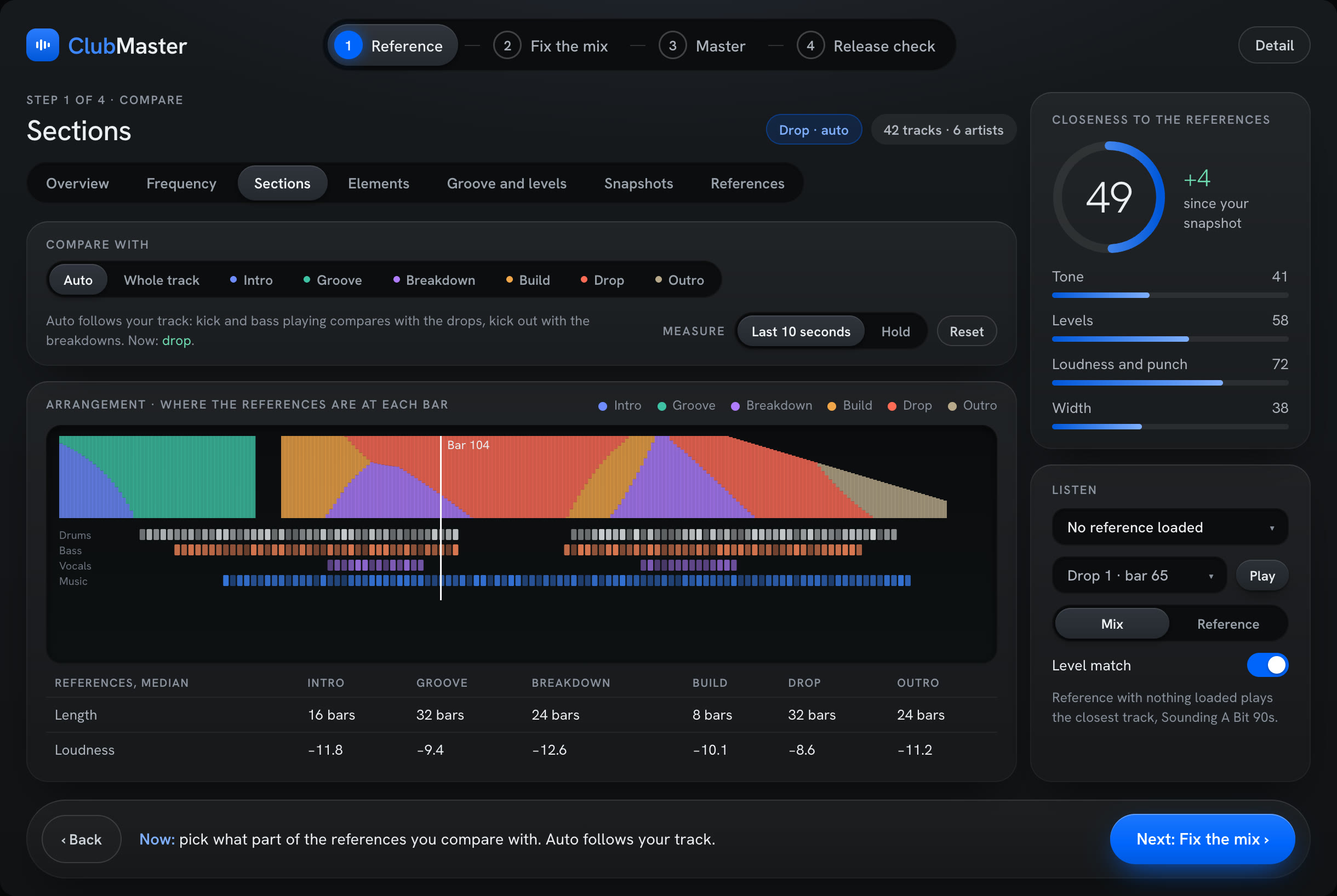
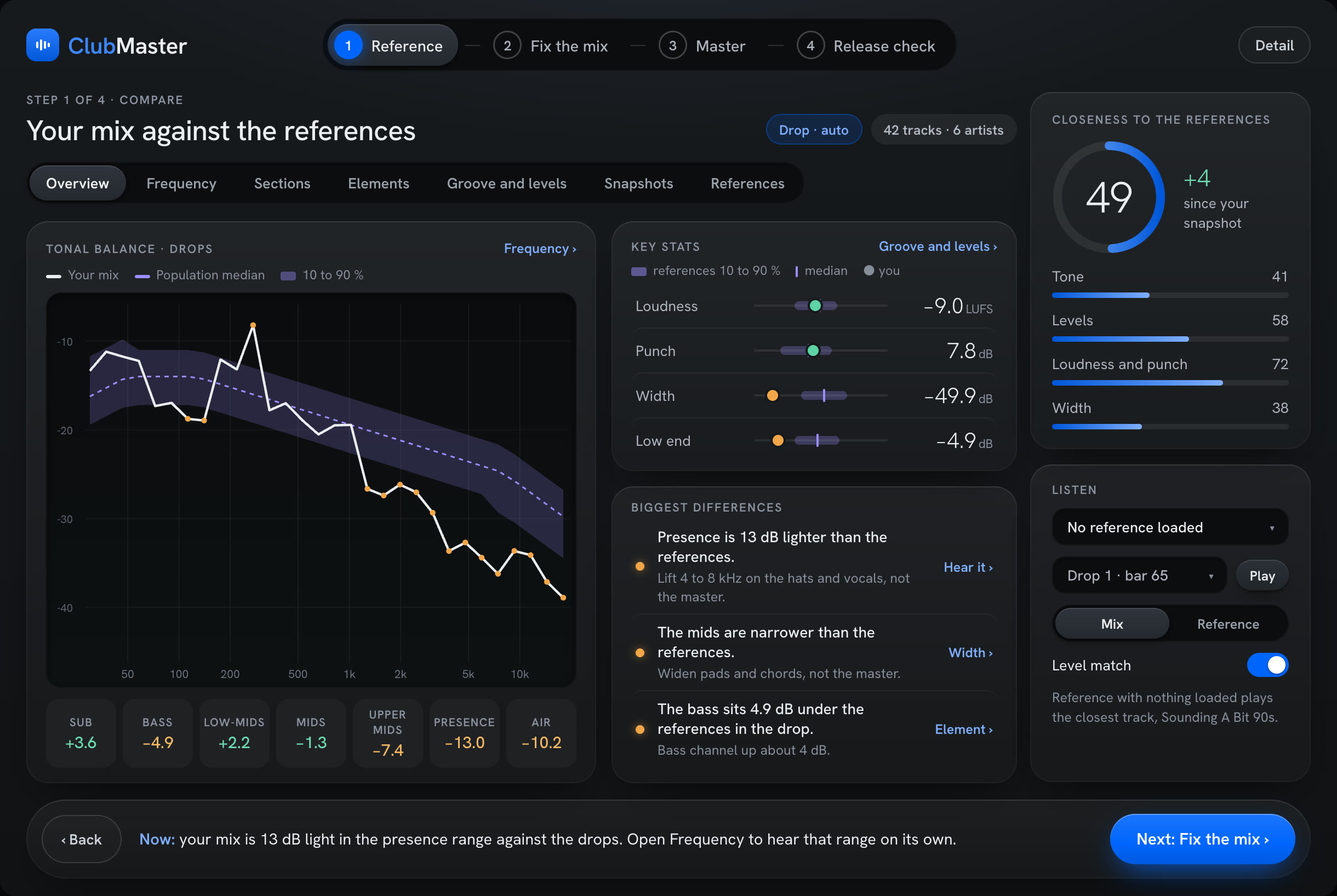
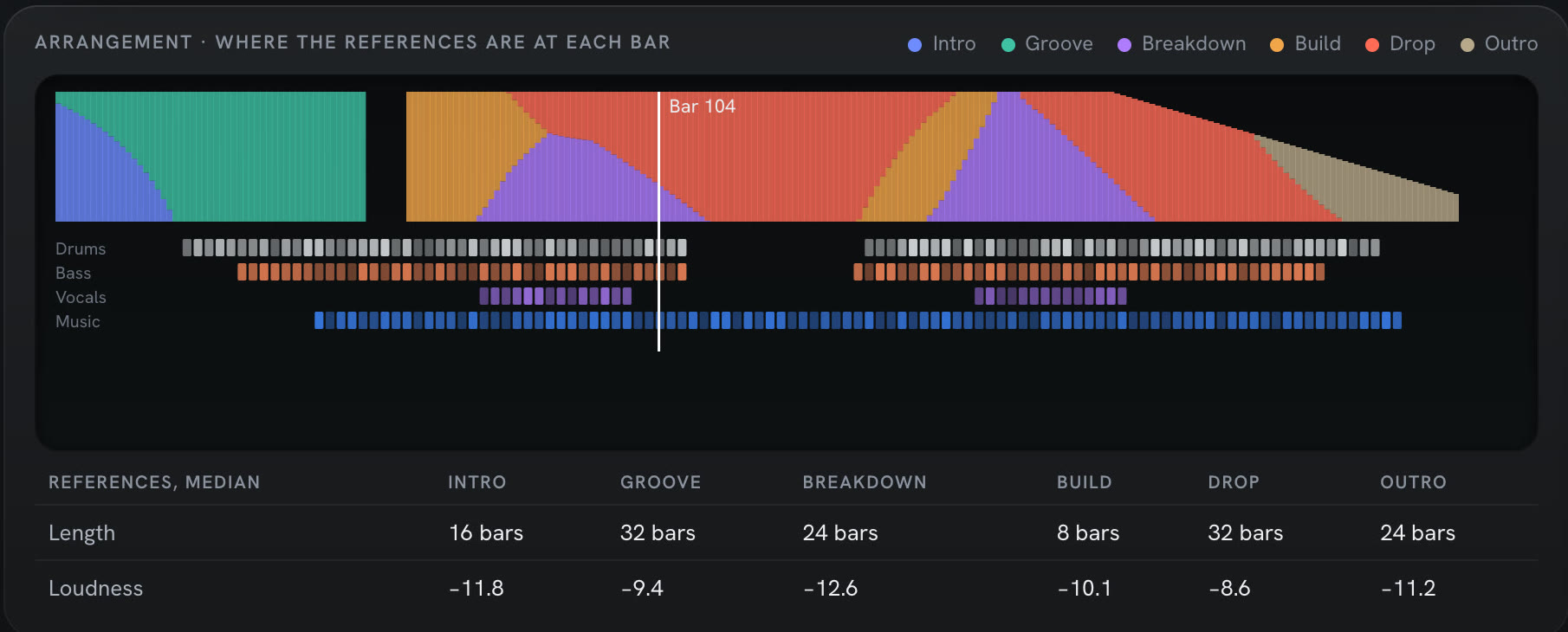
Arrangement.The references' layout, bar by bar, and Live sets built from it.
How it works
- The strip: what share of your references is in the intro, groove, breakdown, build, drop or outro at each bar, drawn against Live's playhead, with the drums, bass, vocals and music of your own track underneath
- Medians: the references' section lengths in bars and loudness per section, under the strip
- Build template: writes a Live template from the ticked songs: median tempo, section markers, track groups, timing and a master chain made from Live's own devices, into User Library › Templates · start with File › New Live Set from Template
- Arrangement set: right-click a reference for an Ableton Live set with its audio, tempo, locators at every section and a Structure track, so its layout sits next to yours · one set per song, or all ticked songs at once
- Summary sheet: right-click a reference for a one-page sheet with its arrangement timeline, section lengths, loudness and width per band; opens in your browser
- Ableton Live only: Build template and Arrangement set are greyed out in other DAWs; the strip and the sheet work everywhere
Ableton and Ableton Live are trademarks of Ableton AG.
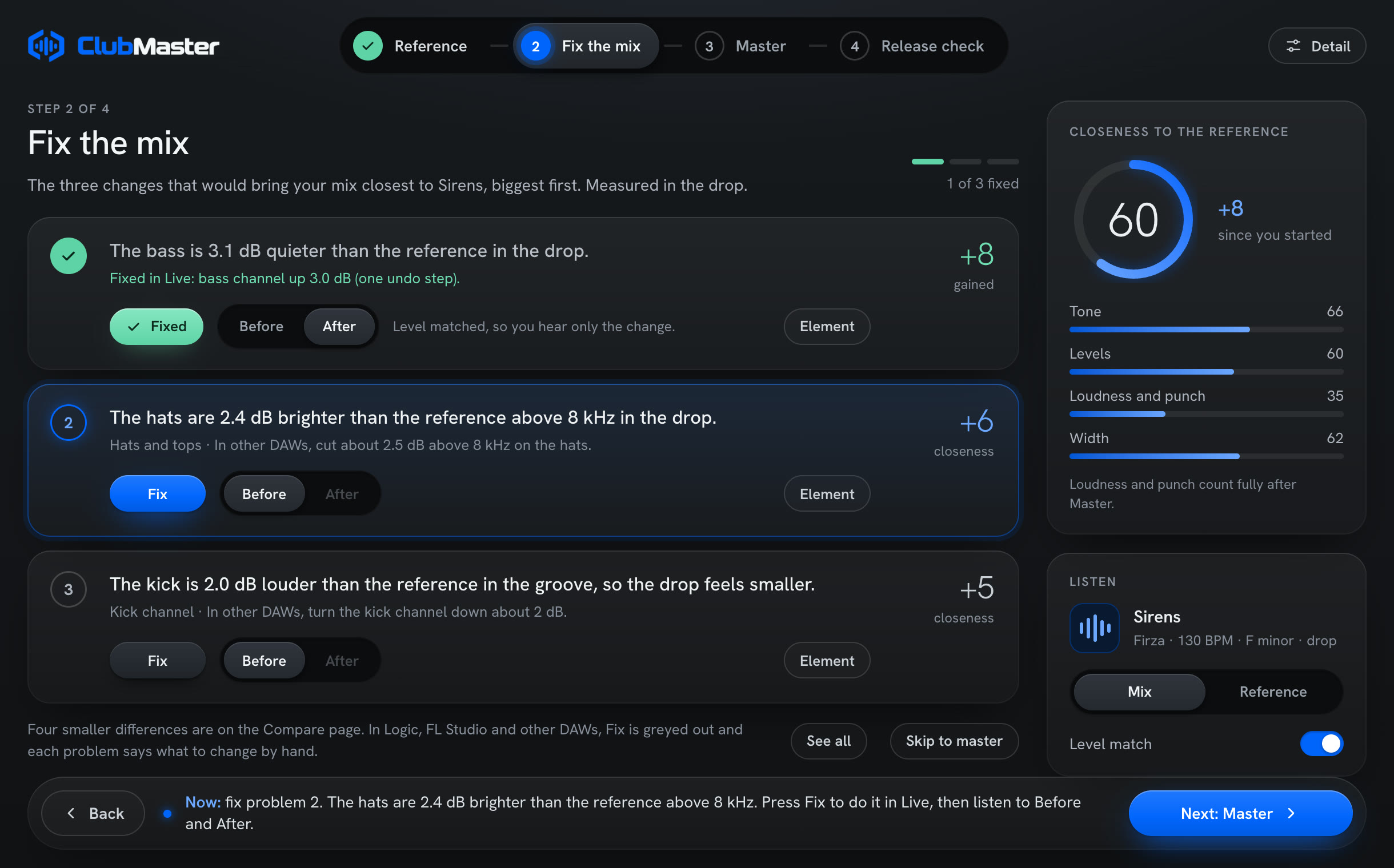
The biggest gaps first.A Fix button for each in Ableton Live.
How it works
- Problems are ranked by how much fixing each would raise the closeness score
- The top three come first, each in plain words (for example: the bass is 3.1 dB quieter than the references in the drop)
- In Ableton Live: Fix changes your set directly as one Live undo step; ClubMaster measures the result and takes it back unless the mix got closer
- MIX & MASTER: one button fixes the mix in Live, then masters it
- Before / After to hear each fix · in other DAWs the same list tells you what to change by hand
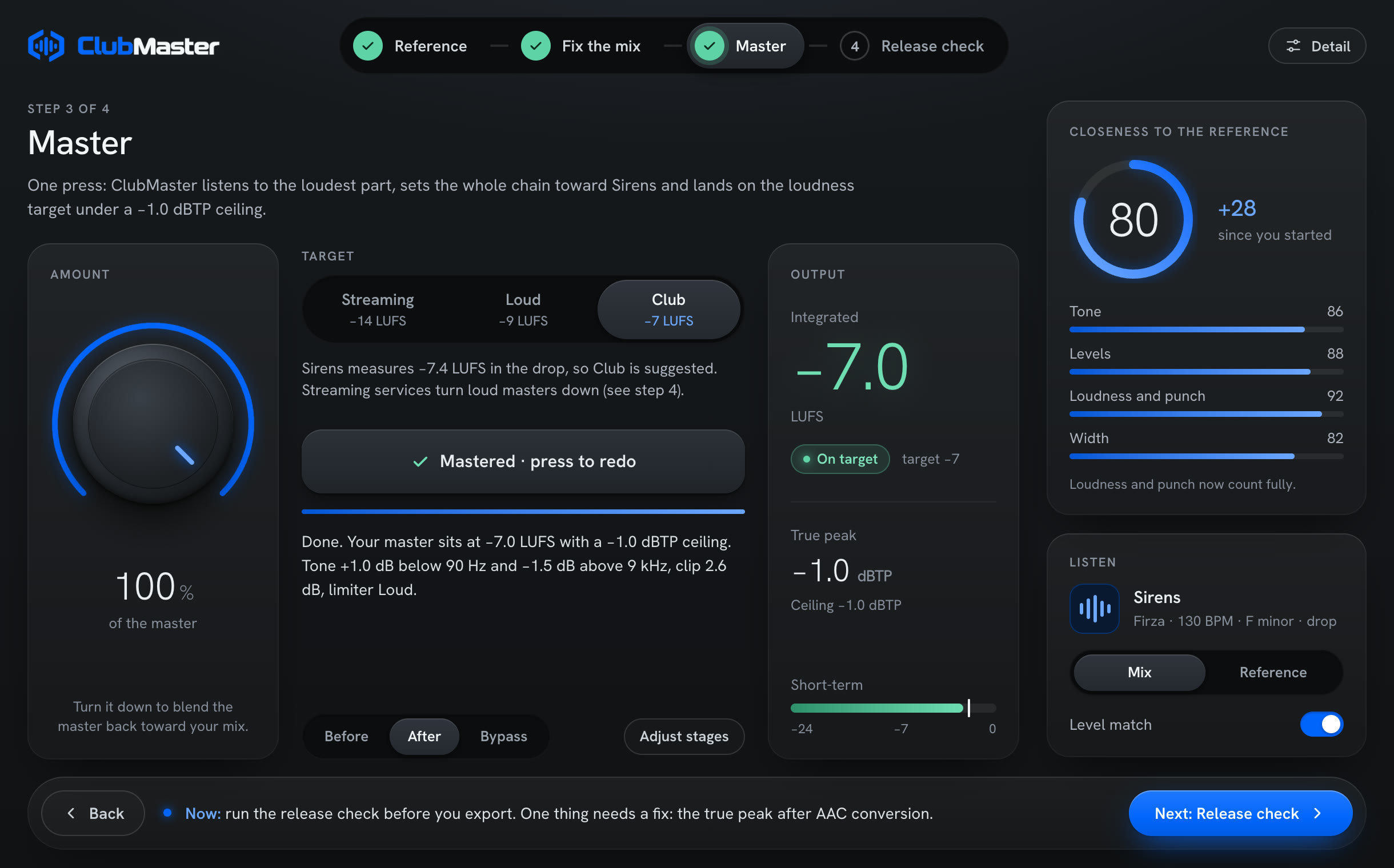
One chain, one AMOUNT dial.Streaming −14, Loud −9 or Club −7 LUFS, under −1.0 dBTP.
How it works
- Listen: ClubMaster learns the loudest part of your mix; the audio it learns from is never saved
- The chain: tone, resonance taming, saturation, width (low end kept mono), gain, clipper, limiter, set together toward your references
- Loudness: the gain for each target is found by running the real chain in the background, so the master lands on the target you pick
- AMOUNT: 0–100% scales every stage at once, loudness included; 0% leaves the mix untouched
- True peak: the limiter checks the peaks between samples with 8× oversampling
- Before / After: matched in loudness, so you hear the change rather than the volume
Release check (streaming loudness preview, true peak after AAC encoding, mono and phase) is in design. Ableton and Ableton Live are trademarks of Ableton AG.
The chain, stage by stage
Seven stages in this order. LISTEN sets each one from your mix and the references; you tune with AMOUNT, the trims and the limiter style. The same code runs live and in the background simulation that finds the loudness.
1 · TONE
EQ toward the references' balance
- Bands
- Low shelf 90 Hz · bells 220, 550, 1,400 and 3,500 Hz · high shelf 9 kHz
- Set by LISTEN
- Six gains, fitted to the difference between your mix and the references, then corrected once at the simulated output
- Range
- Up to ±4 dB per band at AMOUNT 100% · in MIX & MASTER only what sits outside the references' 10–90% range is corrected, up to ±6 dB, with no narrow bells
- Your control
- TONE STRENGTH 0–200% · on / off
2 · TAME
Resonance taming, ClubTame's SURGICAL engine
- Band
- 200 Hz–12 kHz · attack 5 ms · release 80 ms · stereo linked
- Set by LISTEN
- Depth = 0.7 × (your mix's resonance minus the references'), nothing under 0.75 dB, capped at 6 dB
- Your control
- DEPTH TRIM ±6 dB · on / off
3 · HEAT
Saturation and glue, ClubHeat's engine with the low-end mode on
- Fixed
- TAPE character · RMS detector, attack 30 ms, release 250 ms · side-chain high-passed at 90 Hz · knee 6 dB · 2× oversampling · level-neutral
- Low-end mode
- TAPE drives the lows 6 dB less · the compressor reads the true bass level, so it doesn't ripple
- Set by LISTEN
- Strength from the gap between your mix's punch and the references', 0–100%; off under 5%
- Your control
- GLUE TRIM ±100% · on / off
4 · WIDTH
Mid / side, with the bass kept mono
- Mono bass
- Below 120 Hz the sides are turned down toward mono, with a clean crossover so the width above stays
- Set by LISTEN
- Sides above 120 Hz nudged −4 to +3 dB toward the references' width, weighted by band
- Your control
- SIDES TRIM ±6 dB · on / off
5 · GAIN
Loudness to the target
- How
- The gain for each target is found by running the real chain over the learned audio in the background, to within 0.03 LU · switching TARGET is instant · changing a trim or switch re-runs it after 0.6 s
- Range
- −24 to +36 dB · push capped at 14 dB over the plain loudness gain; a very dynamic mix on Club can stop short, and the LOUDNESS card says how loud it got
- Your control
- LOUDNESS TRIM ±3 dB · on / off (off = no push, the ceiling still holds)
6 · CLIP
Peak shaver, ClubClip's Tight engine
- Fixed
- 2× oversampling
- Set by LISTEN
- Shaves about 40% of the typical peaks' overshoot, at most 4 dB
- Your control
- SHAVE TRIM ±3 dB · on / off
7 · LIMIT
True-peak limiter
- Ceiling
- −1.0 dBTP, fixed · 1.5 ms look-ahead · 8× inter-sample peak estimate · program-dependent release, 100 ms
- Styles
- Clean · Modern (default) · Loud. Modern and Loud hold the gain through each bass cycle and send transients to a 4× clip stage
- Your control
- LIMITER STYLE · on / off
MIX & MASTER, step by step
What the button does in Ableton Live
- 1 · Clears what an earlier MIX added, so it solves from your own mix
- 2 · Finds every element (kick, bass, drums, vocals, music, FX) from track names, clips, samples, instruments and MIDI · MIDI tracks with no instrument are never measured or moved
- 3 · Measures one 4-bar loop of the drop: the whole mix, then each element soloed for a few seconds, twice first to learn the noise
- 4 · Solves element levels, channel EQ and the broad master tone in one go, each fault fixed where it comes from · levels up to 5 dB per element · channel EQ up to 6 dB · master tone up to 6 dB
- 5 · Applies the moves as one Live undo step: on the channel fader only when it has no volume automation, otherwise on a CR Level Utility at the end of the track · faders with automation are never written
- 6 · Checks: measures again and keeps a change only if it improves on before by at least 0.3 dB (or twice the noise); otherwise it's undone
- 7 · Reports the score before → after, what moved, and what MASTER will take on the master
- 8 · Masters: picks the target nearest the ticked tracks' loudness, sets AMOUNT to 100%, Modern limiter, and listens again on the improved mix
- Time: about 2–3 minutes, hands off Live
Fix the mix, and what's left for you
- Find the problems: up to three, biggest first, each in one sentence with its gain in closeness · two moves that only help together count as one problem · about a minute
- FIX: that problem's moves as one Live undo step; measured, and undone unless better · the card turns green when kept · Cmd+Z in Live takes a kept fix back
- Before / After on each problem, level-matched
- Left for you: up to four lines after the result for what MIX can't do itself, starting with "No room at …" when two sounds fill the same range and EQ can't separate them
- The Live link: ClubBridge, a Control Surface script the installer puts in Live's User Library · one-time step: Live › Settings › Link, Tempo & MIDI › Control Surface › ClubBridge, Input and Output None
- Several ClubMasters in a set: MIX talks to the one hearing music
- Other DAWs: the same problem list tells you what to change by hand; COMPARE, the reference player, level match and the master chain all work
- Nothing ticked: MIX, FIX and COMPARE aim at the built-in club / house target
Ableton and Ableton Live are trademarks of Ableton AG.
Loudness, meters, latency
- Targets
- Streaming −14 · Loud −9 · Club −7 LUFS (ITU-R BS.1770 / EBU R128), measured on the loudest part of your mix · ceiling −1.0 dBTP always
- Where it lands
- Within 0.5 LU of the target on every test mix, typically within 0.05 LU · a whole song with a quiet intro reads lower than its loudest part · in our tests, October 2026
- True peak
- Worst case −1.10 dBTP across 44.1, 48, 88.2, 96 and 192 kHz and block sizes from 32 to 4,096, measured with an independent 8× meter · in our tests, October 2026
- LISTEN
- Learns 12 s of the loudest part · starts by itself on the first music · restarts from any part 3 dB louder · never re-adapts after that · first master about 15–20 s after play
- AMOUNT
- 0–100% scales every stage at once, loudness included · 0% leaves the mix untouched, still under the ceiling
- Before / After
- BEFORE is your mix through gain, clipper and limiter only, so it's as loud and under the same ceiling: the switch changes the mastering moves, not the volume · matched within 0.3 dB
- Meters
- Integrated LUFS with RESET · short-term 3 s with the target marked · true peak · limiter gain reduction · a summary line of what the master did
- Latency
- 2,319 samples at 48 kHz, 48.3 ms · the same for every setting, target, BYPASS and BEFORE · reported to the host
- Oversampling
- HEAT 2× · CLIP 2× · limiter clip stage 4× · true-peak estimate 8×
- Sample rates
- 44.1 to 192 kHz · stereo or mono
- Safety
- BYPASS is click-free and latency-matched · bad input (NaN, infinity) comes out finite and under the ceiling · no allocation and no locks on the audio thread · in our tests, October 2026
- Automation
- All 17 parameters: AMOUNT, TARGET, BEFORE, BYPASS, six stage switches, six trims, LIMITER STYLE
- Sessions
- Settings, window size, the learned plan and measurements are saved with the project, about 3 KB, never audio or licence data · a reloaded session sounds the same and comes back mastered without listening again
Measured
Each stage of ClubMaster's chain, measured. Our own numbers, in our tests, October 2026; resonance taming also against soothe3, with its wins shown too.
Low end through the whole chain
ClubMaster with HEAT's low-end mode, before → after · lower is cleaner
- 50 Hz bass distortion
- −28.5 → −42.7 dB
- 30 Hz bass distortion
- −28.2 → −40.0 dB
- Bass dirtying the vocals (50 Hz + 1 kHz IMD)
- −18.9 → −28.9 dB
- Bass mono (MONO 0.6, side at 50 Hz)
- −4.1 → −7.6 dB
- On 3 club tracks at −9 LUFS
- Distortion 3–4 dB lower · 40–100 Hz bass kept within ±0.3 dB (lost up to 0.8 dB before)
ClubMaster's real chain, every stage on, Loud target, Modern limiter, 44.1 kHz, development build, October 19, 2026. Music: 30 s of three club tracks. Cost: the 31.5 Hz band comes out 0.3–0.7 dB louder than before.
Saturation (HEAT)
Bass distortion when set to 5% distortion at 1 kHz · lower is cleaner
- 30 Hz
- 1.15%
- 50 Hz
- 0.97%
- 100 Hz
- 2.04%
- Kick + vocal IMD (50 Hz + 1 kHz)
- 4.58%
In our tests, October 2026, on ClubHeat's TAPE at its best quality setting; ClubMaster's HEAT runs the same code path with the low-end mode on. Bass level change at 5%: +0.6 to +1.0 dB. HEAT's compressor uses different settings in ClubMaster, so ClubHeat's compressor results are not shown here.
Limiter (LIMIT)
Modern style (default) · 15 club tracks: 3 of ours, 12 released under Creative Commons licences · pumping lower is better, distortion more negative is cleaner
- Pumping at −8 LUFS
- 0.27 dB on average · range 0.00–1.13 dB
- Pumping at −7 LUFS
- 0.61 dB on average · range 0.06–1.90 dB
- Target loudness reached
- 15 of 15 tracks at −8 LUFS · 12 of 15 at −7; the other three fell 0.3–1.1 dB short
- 50 Hz bass, pushed 12 dB into the limiter
- Distortion −105 dB
- 30 Hz bass, same test
- Distortion −94 dB
- Intermodulation (60 Hz + 7 kHz, SMPTE)
- −43 dB
- Where it struggles
- Above 1 dB of pumping at −6 LUFS on dense tracks
In our tests, October 19, 2026, one Mac, ClubMaster development build. Pumping is the gain dip after each kick, read off 5 ms gain curves.
Clipper (CLIP)
Hard clipping, Tight engine · more negative is cleaner
- Aliasing (9 kHz tone, +3 dB over the ceiling)
- −54.6 dB
- Music artefacts (three club tracks)
- −27.0 dB
In our tests, default quality, 44.1 kHz, October 2026. Measured on ClubClip's Tight engine, which ClubMaster runs as its CLIP stage.
Resonance taming (TAME) vs soothe3
Each set to take the same 6 dB off a 3 kHz ring · how much else changed, closer to 0 is cleaner
| Neighbours | Plain noise | Broad build-up cut | |
|---|---|---|---|
| ClubMaster TAME (SURGICAL) | 0.01 dB | −0.01 dB | −0.32 dB |
| soothe3 soft | 0.41 dB | −0.52 dB | −2.22 dB |
| soothe3 hard | 1.11 dB | −0.66 dB | −2.37 dB |
In our tests, 44.1 kHz, October 19, 2026, on ClubTame's SURGICAL engine, which ClubMaster runs as its TAME stage (with its own band, 200 Hz–12 kHz, and timing). soothe3 1.0.5 at its defaults except mode and depth. soothe3 evens out broad build-ups more: SURGICAL only goes after clear peaks. Neighbours = 700 Hz–1.5 kHz and 6–12 kHz.
soothe is a trademark of oeksound. ClubPlugins is not affiliated with, sponsored or endorsed by oeksound.
Upgrades in progress
Free updates for everyone who buys ClubMaster.
- Goal: every stage measured, every result published here, and each one improved in free updates
- Where it stands: saturation, clipping, limiting and resonance taming are measured above; resonance taming leads soothe3 on neighbouring frequencies and plain noise, and soothe3 evens out broad build-ups more; the low-end mode and the new limiter are in testing
- Low end: HEAT's low-end mode and the new limiter, measured above, in testing now
- Elements (stem splitting): being refined further before its beta
- Release check: in design
Five effects
- ClubTame
- Removes harsh resonances
- ClubEQ
- 64-band dynamic EQ
- ClubLimit
- True-peak limiter
- ClubHeat
- Saturation and glue
- ClubClip
- Clipper
Details
- Formats
- AU, VST3, standalone app
- Mac
- macOS 11 or later · Apple silicon and Intel, one universal installer
- Windows
- Beta, VST3 only · 64-bit Windows 10 and 11 (x64) · not code-signed yet, so Windows may warn (SmartScreen); the read-me in the ZIP has the steps · install by copying ClubMaster.vst3 to C:\Program Files\Common Files\VST3 · ClubMix is Mac-only for now · Download the Windows beta
- CPU
- About 2% of one core with every stage on, 48 kHz, 512-sample blocks, Apple silicon · COMPARE pages 1–4.5% more while music plays · in our tests, October 2026
- Window
- Four sizes, 85 / 100 / 125 / 150% of 1,220 × 818 · each instance keeps its size with the session; a new one opens at your last size
- DAWs
- Made for Ableton Live 12 · MIX & MASTER, Fix the mix and My channels need Live · in Live it goes last on the master track · in other DAWs everything else works
- References
- Any number, no cap in the software · WAV, AIFF, MP3, FLAC, M4A · 30 seconds to 20 minutes each · a few seconds of analysis per song · only read, never changed; only the name is shown
- Built-in target
- Medians and 10–90% ranges of 42 club and house tracks: short-term loudness −8.0 LUFS (−9.3 to −6.6), punch 8.1 dB, left / right correlation 0.96 · no track or artist data ships
- Targets
- Streaming −14 · Loud −9 · Club −7 LUFS · −1.0 dBTP ceiling
- Price
- $30 · price includes tax · free updates through every 1.x version · key emailed within minutes · one person, up to two computers (Mac or Windows)
- Trial
- 7 days, everything unlocked · when it ends, audio passes through untouched at the same latency until a key is entered · all sales are final, so try first
- Installer
- Signed and notarised · AU and VST3 in /Library/Audio/Plug-Ins, the app in /Applications, the MIX helper and the Live script in Application Support · updates replace old versions · an uninstaller is on the disk image
- Privacy
- No analytics; no audio or usage data leaves your Mac · a once-a-day update check fetches the version list only
- Release
- Early access since October 29, 2026 · Download the 7-day trial · Buy · $30
You're on the list
Confirm with the link in your inbox.