 ClubPlugins

Trust your USB.Free DJ library and USB prep for Mac.
- Key, BPM, beat grid, auto cues and energy for every track
- USB for CDJ / XDJ style players, checked before and after writing
- No rekordbox needed: own library, own analysis, own USB export
- macOS 12+ · Apple silicon and Intel · Windows 10 and 11 beta
Mac now · Windows in beta
We'll email you the link. Open it on your Mac.
What SpinList solves
- 01A USB that fails at the club after it checked out in rekordboxChecked before and after writing
- 02Unsupported and corrupted filesCaught before the gig
- 03Wrong keys and drifting beat gridsKey 67% exact · grids judged against the kick
- 04Broken file paths and duplicate tracksRelinked and merged, with Undo
- 05Hot cues placed by handAuto cues on 8-bar phrases
The problemA DJ checks everything in rekordbox, and the USB still fails in the club.
Checked before and after writing.Every file present and matching the database.
How it works
- Before writing: blocks APFS, NTFS and read-only drives; flags exFAT for CDJ-2000NXS2 and older and FAT32 with a GUID map; checks free space, path length and illegal characters
- While writing: writes only what changed and backs up the USB's database first, so one click undoes an export
- After writing: confirms every track in the database is on the USB at the right size, and that the database and analysis files read back
- Deep verify: reads every file back from the USB, which catches a flaky drive
- Several USBs at once, each verified · auto eject when done · new in 1.1
rekordbox, folders and USBs in one library.rekordbox is read, never changed.
How it works
- rekordbox: reads your rekordbox library (tracks, cues, playlists and analysis) read-only; rekordbox is never changed
- Folders: add any folder on your Mac or an external drive, including cloud-synced folders (Dropbox, iCloud Drive, Google Drive); new tracks are analyzed as they come in
- USBs: shows what's on a USB matched against your library, and can export using the files already on it, without a second copy
- Back from the players: hot cues, memory cues and loops set on the player, plus play counts and ratings, come back from the USB; you choose per track
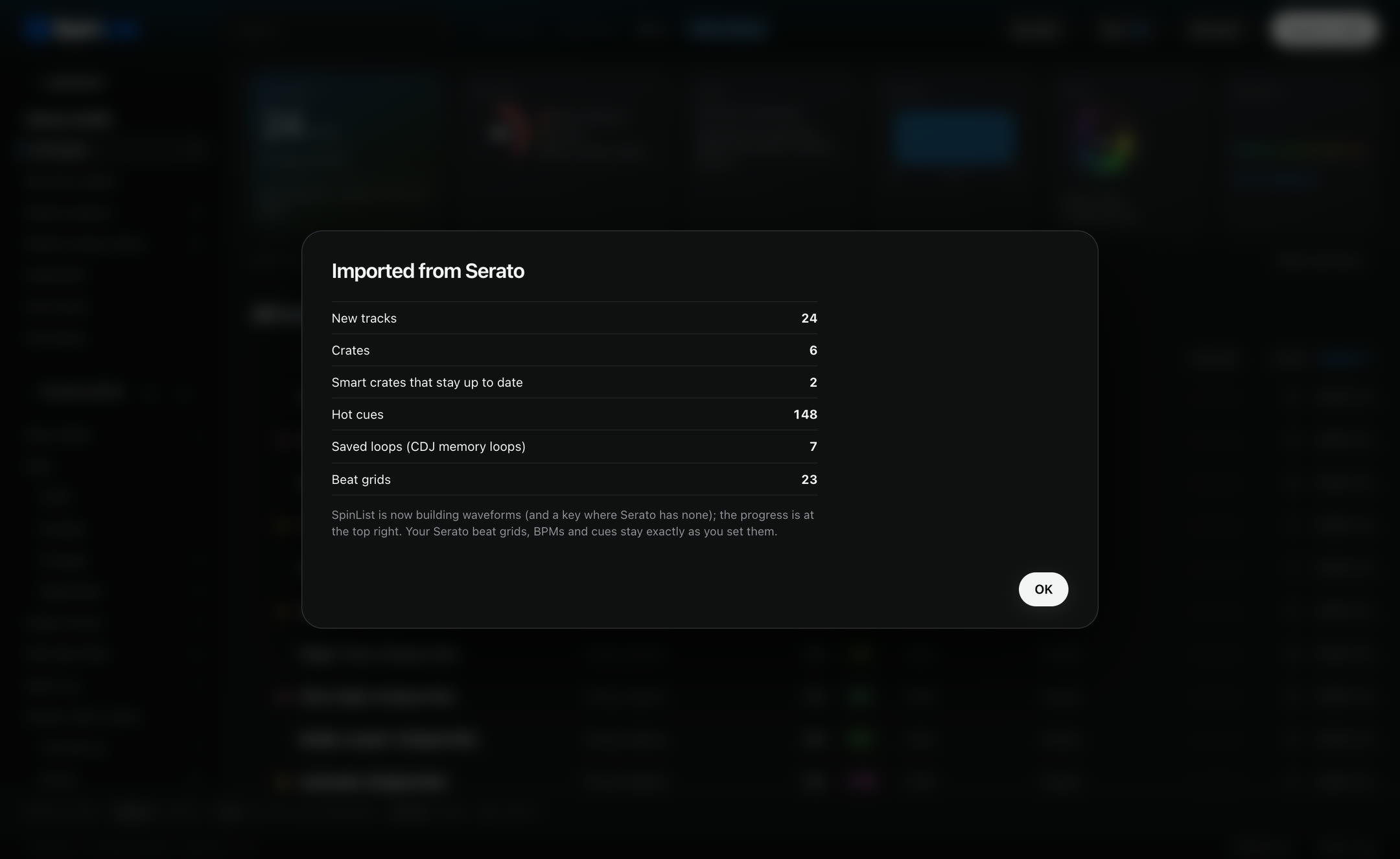
- Serato: crates, cues, loops and grids, new in SpinList 1.1 (details)
- Purchases: paste a list of tracks you bought (CSV or text) to see which are missing from your library
- Audio files are never modified · everything stays on your Mac
The problemA DJ moves from Serato to CDJs, and the hot cues, colors, crates and beat grids don't come across.
Import from Serato
What comes across
- The Serato library in ~/Music/_Serato_ and the _Serato_ folder on every drive
- Crates, nested crates (as folders) and smart crates
- Hot cues 1–8 with their names and colors, matched to CDJ colors
- Saved loops, as CDJ loops
- Serato beat grids, including tempo changes · BPM and key
- Each track's Serato Date Added
- 40,000 tracks in about 10 seconds (our test library)
How it works
- Your Serato grids and cues are kept as they are; SpinList's own analysis only fills the gaps
- Serato's files and your music are never written to
- Importing again adds no duplicates
- Then export to a USB for CDJs as usual, with every check described above
- Not carried over (no CDJ equivalent): Flips, Serato gain, grid lock
Serato is a trademark of Serato Audio Research Limited. rekordbox, CDJ and XDJ are trademarks of AlphaTheta Corporation. SpinList isn't affiliated with or endorsed by either company.
Universal bridge.Move your cues, loops, grids and crates between Serato, rekordbox and CDJs.
Non-destructive: your library is always backed up first, and any conflict is shown for you to decide — never overwritten.
What it moves
- Hot cues, memory cues and saved loops
- Beat grids, BPM and the track key
- Crates, playlists and folders
- Make a CDJ USB at the end — verified before and after writing, free like all of SpinList's export
Non-destructive, always
- A snapshot of your library before anything moves, with one-click undo
- Conflicts are shown side by side; nothing is overwritten without you
- Your Serato, rekordbox and audio files are read, never written to
Where it stands
- In final on-deck validation now. The last step is a check on real CDJ hardware.
- Today it goes one way, out to a CDJ USB. Writing changes back into your library stays off until the hardware check passes: a stick that needs a tweak is easy to redo, a changed library isn't.
- The grid itself is a strength, judged against each track's own kick — see Measured.
Early-access build, off by default. We'd rather be late than wrong at the club.
Serato is a trademark of Serato Audio Research Limited. rekordbox and CDJ are trademarks of AlphaTheta Corporation. SpinList isn't affiliated with or endorsed by either company.
The problemA DJ's library has broken file paths and duplicate tracks, and the USB has unsupported or corrupted files on it.
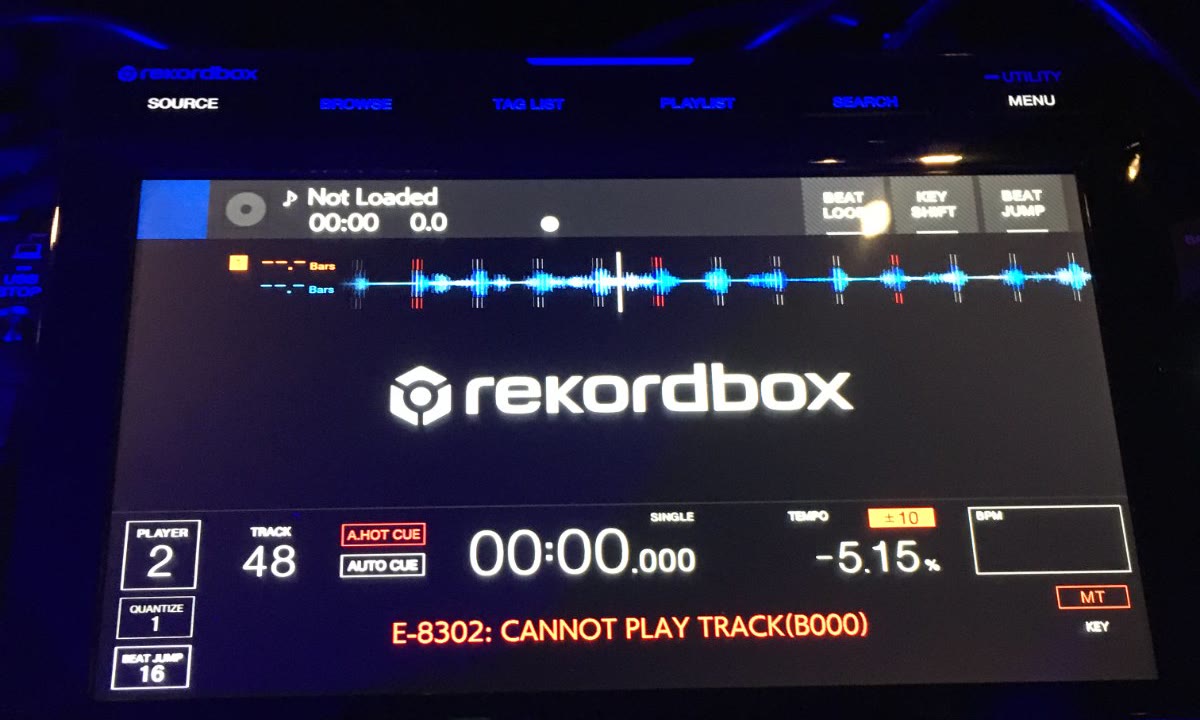
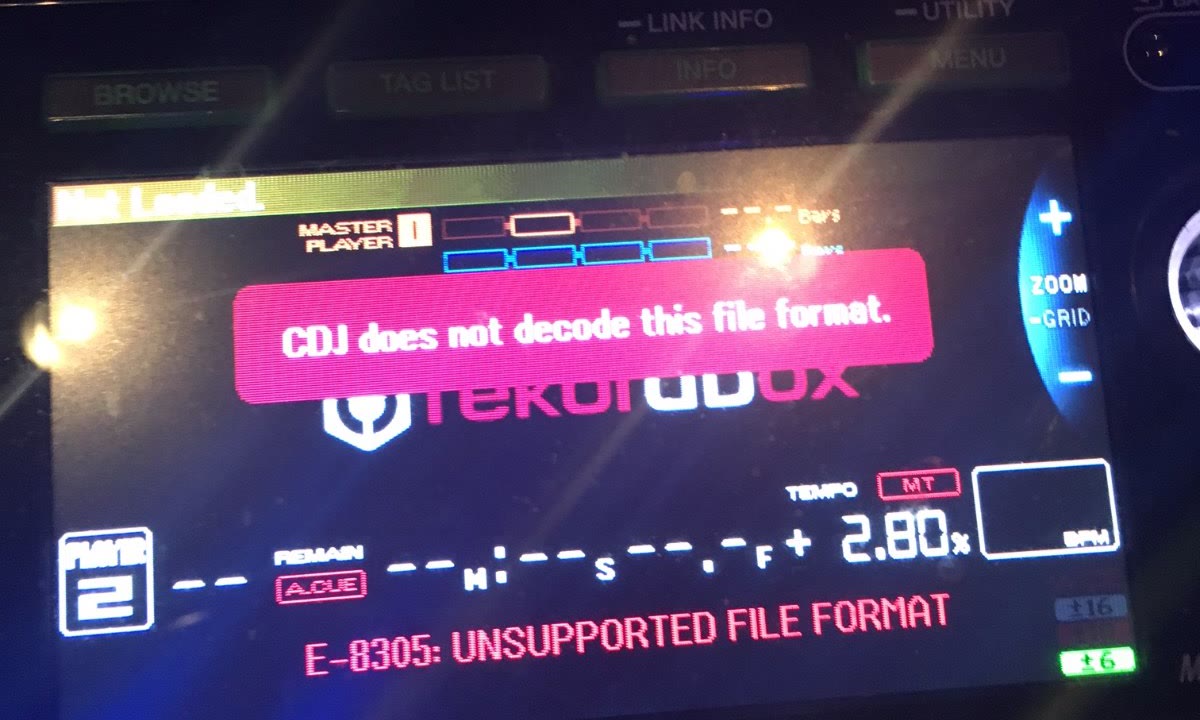
Player errors E-8302 and E-8305, caught before the gig.Every fix verified, with undo.
| Player error | What it means (AlphaTheta) | What SpinList checks |
|---|---|---|
| E-8302 Cannot play track | The track file can't be read correctly; it may be corrupted | Missing and zero-byte files before export · every file confirmed on the USB after export · Deep verify reads every file back |
| E-8304 / E-8305 Unsupported file format | The player can't play that file's format | Flags formats only newer players read · Max Compatibility writes FLAC, ALAC and high-resolution files as WAV for older players |
How it works
- Duplicates: same artist, same full title including the mix name, and the same length; merging keeps the best copy and moves its cues, playlists and ratings
- Broken paths: finds files that moved and relinks them
- Empty files: zero-byte files found and moved to the Trash
- Gaps: tracks without key or energy, playlist tracks without cues
- Every fix: a snapshot first, a checklist after (nothing lost, playlists intact, no audio touched), logged, and undoable
Error meanings paraphrased from the AlphaTheta Help Center (CDJ-3000 error messages), checked October 18, 2026. Photos posted by DJs on the Pioneer DJ community forum (March 20, 2016 and September 24, 2020). CDJ, rekordbox and Pioneer DJ are trademarks of AlphaTheta Corporation; ClubPlugins is not affiliated with AlphaTheta.
The problemA DJ's software gets keys and beat grids wrong.
Key detection: 67% exact.rekordbox: 59%.
How key detection works
- An ensemble of small neural networks reads the audio, and they vote on the key
- Tested on 604 human-labeled dance-music clips (GiantSteps Key) not used in training: 67.4% exact, rekordbox 58.8%
- Safe to mix (exact, one Camelot step or relative key): 81.3%, rekordbox 73.3%
- Beyond dance music: 67.5% exact on 837 clips across 9 genres (GTZAN)
How the beat grid works
- Tempo family: the first tempo estimate is checked against half, double and other related tempos, so drum & bass isn't read at 116 or 88
- Half-beat check: weighs the kick against off-beat hi-hats and basslines so the grid doesn't land half a beat out
- On the kick: beats sit where the kick starts to rise, not at its loudest point
- Tempo: BPM rounded to the nearest 0.5, and the grid built at that exact tempo; if a track speeds up or slows down, the grid follows (new in 1.1)
- Grid check: measures any stored grid against the kick (offset, drift, tempo, downbeat) and fixes it in one click, with undo
The problemA DJ's beat grid drifts after a breakdown and has to be fixed by hand.
New beat-grid detection
What it does
- Finds beat 1 of the bar
- Places the grid on the kick
- Follows tempo changes, and keeps a steady grid on steady tracks
- Checks each track with more than one method and keeps the most confident result
- Adds a neural-network beat and downbeat detector (Beat This!, published by Johannes Kepler University Linz under the MIT license), combined with SpinList’s own kick lock and tempo checks
Measured so far
- Judged against each track's own kick drum, not against another app's grid
- Your existing grids stay as they are until you choose Upgrade grids to the new engine; grids you edited are never changed, and the upgrade can be undone
Out now in SpinList 1.2, a free update. rekordbox is a trademark of AlphaTheta Corporation; SpinList isn't affiliated with or endorsed by AlphaTheta.
The problemA DJ places every hot cue by hand.
Auto cues A–H on 8-bar phrases.Energy rated 1–10 against your own library.
How auto cues work
- Reads bass, mid and high energy on every beat
- Finds where the bass comes in and drops out, and where the energy builds
- Snaps each moment to 8-bar phrases on downbeats
- A Start · B Groove · C Breakdown · D Build · E Drop · F Peak · G Outro · H End, plus a memory cue at every section
- A cue lands only where the track has that section; hot cues you set yourself are never touched
How energy works
- Measured on each track's full-on sections, not its first minute: intensity, bass drive, drum density, brightness, loudness and tempo
- Ranked against your own library and spread across 1–10, so a library of bangers can hold many 8s and 9s
- Ratings you set by hand are kept · sets can be ordered by energy
Also in SpinList
Set ordering by energy
Warm-up to peak, rough transitions flagged
Cues back from the USB
Hot cues, memory cues and loops set on the player
Player menu and DJ name
Browse categories, order and sort, set on the Mac
Extras
Purchases
Paste a bought-tracks list (CSV / text): missing, owned, different mix
Smart playlists
Any field, compatible key, BPM range, tags, date added
Song browser
Beside the playlist, with a key-match filter
Mixes well with
Key, BPM and energy matches, each with a reason
Relink
Finds files that moved
Search your USB
Look up what's already on the USB
Drag to the drive
Drop songs or playlists onto the USB to add them
Junk files
Removes macOS "._" files from the USB
Deep verify
Every file on the USB read back
Player dock
Waveform, hot cues, Space to preview · compact player (M)
rekordbox import
Tracks, cues, playlists, waveforms · rekordbox itself never modified
Updates
Daily check (can be switched off) · old versions moved to Trash
All features
Import
- rekordbox library: tracks, cues, playlists, waveforms
- rekordbox itself never modified
- Add music folders
- Audio files never modified or deleted
Analysis
- Key: neural detector, 7 networks voting
- BPM rounded to the nearest 0.5, and the grid built at that exact tempo
- Beat grid, plus the extended grid newer CDJs use
- Energy 1–10, rated on each track's full-on sections
- Auto cues A–H on 8-bar phrases: start, groove, breakdown, build, drop, peak, outro, end
- Memory cue at every section boundary
- CDJ 3-Band waveforms
- MP3 and AAC timed the way the CDJ decodes them, so cues and grids land where the player plays them
- Grid check: offset, drift and tempo against the kick
- Grid follows tempo changes inside a track (ramps and sudden changes) · new in 1.1
- rekordbox-imported analysis kept as-is
- Background re-analysis after updates
Library
- Instant search · sort any column · multi-select
- Drag to playlists, drag to reorder
- Ratings, colors, tags, inline metadata
- Hot-cue editing on the waveform, keys 1–8
- Song browser beside the playlist, key-match filter
- Smart playlists: any field, compatible key, BPM range, tags, date added
- Views: recently added, needs analysis, needs energy, duplicates, missing files
- Purchases: paste a bought-tracks list (CSV / text) → missing, owned, different mix
Sets
- Mixes well with: key, BPM, energy, with a reason
- Auto-sequence a playlist
- Energy curve
- Build a set from suggestions
- Re-organize setlist: Camelot-compatible transitions, small tempo steps, half / double time
- Energy shapes: club arc, steady build, waves, held
- No back-to-back artist
Library health
- Delete empty files (to Trash)
- Merge duplicates: strict match, keeps the best copy, moves cues / playlists / ratings
- Relink moved files
- Bulk energy rating
- Snapshot before every fix · every fix verified and logged
- Delete from library with Undo (last 20)
USB export
- Writes the standard rekordbox database (export.pdb) that every CDJ reads
- Also writes the newer OneLibrary format for CDJ-3000X, OPUS-QUAD, XDJ-AZ and OMNIS-DUO
- Analysis files and artwork
- Writes only what changed
- Skips re-reading files it has already checked: re-exporting a 400-song USB reads 0 MB instead of 129 MB
- Use files already on the USB (no second copy)
- Drag songs or playlists onto the drive to add
- Player menu: categories, order, sort options
- DJ name on load
- Warns before playlists disappear from the USB
- Removes macOS "._" files
- Deep verify: every file read back
- Database backup + one-click Undo
- Search your USB
- Several USBs at once, each verified · new in 1.1
- Max Compatibility: FLAC, ALAC and high-resolution songs written as WAV for older CDJs
- Auto Eject when written and verified
USB check
- Missing and zero-byte files
- Blocks APFS, NTFS, read-only drives
- Warns when a drive is exFAT, which CDJ-2000NXS2 and older players don't read
- Warns when a FAT32 drive was formatted with a GUID partition map: some older players only see drives with a Master Boot Record map
- Free space, path length, illegal characters
- Unanalyzed tracks, duplicates
Pull back from the USB
- Hot cues, memory cues, loops set on the player
- Before / after per track; you choose
- Play counts and ratings
App
- Player dock: waveform, hot cues, Space to preview
- Compact player (M)
- Everything stays on your Mac; nothing uploaded
- Daily update check (can be switched off)
- Old versions moved to Trash on update
- Compatibility report and diagnostics
- Undo / redo for library edits
- Complete backup and restore: library, analysis, artwork, settings
- macOS 12+ · Apple silicon and Intel · Windows 10 and 11 beta
Measured
Key detection · exact key
GiantSteps Key · 604 human-labeled dance-music clips
Same 2-minute clips for both apps, default analysis. Test clips not used in training. Model variants tested: 65.7–67.4%. Measured October 9, 2026; detector unchanged since 1.0.5.
Key detection · safe to mix
Exact, one Camelot step or relative key · same 604 clips
Beyond dance music: 67.5% exact on GTZAN (837 clips, 9 genres), up from 52.3% with the 1.0.4 method.
Beat grids · matches or beats rekordbox
SpinList 1.1.0 vs rekordbox · 602 held-out club tracks
| SpinList 1.1.0 | rekordbox | |
|---|---|---|
| Kick bars steady within 10 ms | 76.5% | 76.0% |
| Tracks on the beat (90% of bars or more) | 67.3% | 67.6% |
| Tracks steady (90% of bars or more) | 44.4% | 43.5% |
Beat lines judged against the kick drum in the audio; neither app is the answer key. Measured October 19, 2026.
rekordbox, CDJ, XDJ, OPUS-QUAD and OMNIS-DUO are trademarks of AlphaTheta Corporation. Beatport is a trademark of Beatport LLC. Camelot is a trademark of Mixed In Key LLC. ClubPlugins is not affiliated with, sponsored or endorsed by any of them.
SpinList vs. rbxport
| SpinList 1.1.0 | rbxport 1.9.0 | |
|---|---|---|
| Where SpinList differs | ||
| Auto cues on phrases | Hot cues A–H on 8-bar phrases, memory cue at each section | No phrase detection; optional memory cue on the first beat |
| Energy and set order | Energy 1–10 per track; orders a playlist by energy | No energy rating or set ordering |
| How key accuracy is measured | Against human-labeled keys: 67.4% exact on 604 GiantSteps clips (rekordbox 58.8%) | Against rekordbox's keys: 141 of 155 match on its reference playlist |
| Your rekordbox library | Imported; SpinList keeps its own library and never writes to rekordbox's | Edited directly once editing is unlocked; a backup is recommended first |
| Where rbxport differs | ||
| Platforms | Mac · Windows (beta) | Mac, Windows, Linux |
| Player link | USB only | LINK EXPORT over Ethernet |
| Both | ||
| Price · analysis | Free · each app runs its own BPM, grid and key analysis, no rekordbox needed | |
| Export | Several USBs at once · FLAC and M4A written as WAV for older players · auto eject | |
| Tempo changes | Grid follows tempo changes inside a track | |
Checked October 18, 2026: SpinList 1.1.0 against rbxport 1.9.0. Sources: rbxport.com and rbxport.com/analysis, the rbxport source code on GitHub (October 16, 2026), and a hands-on test of rbxport 1.9.0 on October 18, 2026. rbxport updates often; corrections: support@clubplugins.com. rbxport is made by TRIODE. ClubPlugins is not affiliated with TRIODE.
What it leaves out
- Need rekordboxNew tracks are added and analyzed in SpinList. Importing a rekordbox library is optional.
- Change your rekordbox libraryIt reads rekordbox's library and never writes to it.
- Change your audio filesTags and analysis live in SpinList's library and on the USB.
- Upload anythingEverything stays on your Mac.
- Play out, yetDJ players: paid upgrade, coming soon.
Questions
Is SpinList free?
Yes, every feature. DJ players will be a paid upgrade, coming soon.
Do I need rekordbox?
No. SpinList keeps its own library, analyzes new tracks itself and writes the USB itself. Importing an existing rekordbox library is optional, and rekordbox is never modified.
Which players read the USB?
export.pdb: all CDJs. OneLibrary: CDJ-3000X, OPUS-QUAD, XDJ-AZ, OMNIS-DUO. SpinList flags formats only newer players read.
Does it change my rekordbox library?
No. It imports tracks, cues, playlists and waveforms, and rekordbox itself is never modified.
Which drive formats work?
FAT32 and exFAT. APFS, NTFS and read-only drives are blocked. You get a warning when a drive is exFAT (CDJ-2000NXS2 and older players don't read it) or when a FAT32 drive was formatted with a GUID partition map (some older players only see drives with a Master Boot Record map).
Can I undo an export?
Yes. SpinList backs up the USB's database before writing; one click restores it.
Which Macs?
macOS 12 or later, Apple silicon or Intel (separate downloads).
Windows?
Yes, in beta: Windows 10 and 11, 64-bit (x64). The installer isn't code-signed yet, so Windows may warn before it opens (what to click).
Download
SpinList 1.1.1 for Mac · free, every feature
Windows (beta): SpinList 1.3.0 for Windows 10 and 11, 64-bit (x64). The installer isn't code-signed yet, so Windows may show "Windows protected your PC" or "Unknown publisher": click More info, then Run anyway. Only install it from clubplugins.com or GitHub (clubplugins/downloads), and check the file first: in PowerShell, Get-FileHash .\SpinList-1.3.0-beta-Windows-x64-Setup.exe should show 7af3db4232d615f1b7632c8807f78dcdd8ccafe108cee7527a46c4edfd1cab01. Same free USB export as the Mac. Beat grids use SpinList's previous grid engine on Windows; the newest one is Mac-only for now. It's a beta: tell us what breaks at support@clubplugins.com.
- macOS
- 12 or later
- Mac
- Apple silicon or Intel (separate downloads)
- Windows
- 10 and 11, 64-bit (x64) · beta · not code-signed yet · Download
- Players
- CDJ and XDJ style players
- Price
- Free · every feature
- DJ players
- Paid upgrade, coming soon
- Help
- support@clubplugins.com